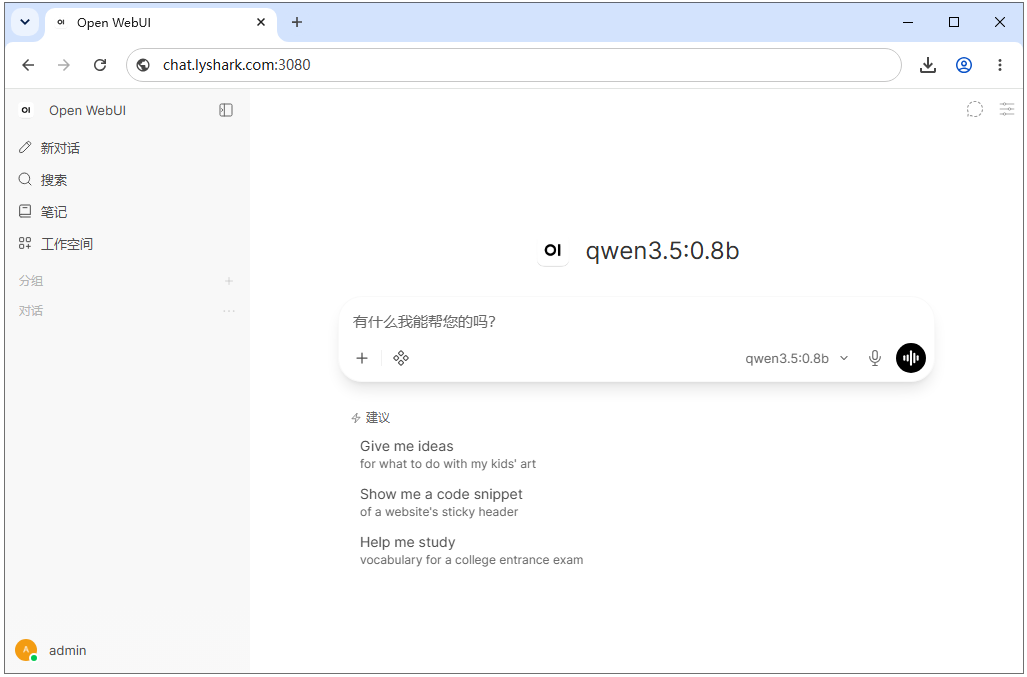
本文将教大家在Ubuntu系统中,从零完成Ollama本地大模型部署与Open-WebUI可视化网页配置,全程采用虚拟环境隔离依赖、配置系统自启服务,最终搭建可远程访问的本地AI交互网页,无需联网调用、运行稳定、适配CPU及GPU本地部署场景,新手可直接复刻操作。
环境适配要求 Python 3.11~3.12(本次使用3.11版本),全程使用虚拟环境隔离依赖,不污染系统原生Python环境;支持CPU模式运行,无NVIDIA/AMD显卡也可正常部署使用,如果用户配置了NVIDIA驱动则该框架会自动识别无需手动配置。
1、执行官方一键安装脚本,自动完成Ollama安装、用户创建、系统服务配置。
root@localhost:~ >>> Installing ollama to /usr/local >>> Downloading ollama-linux-amd64.tar.zst >>> Creating ollama user... >>> Adding ollama user to render group... >>> Adding ollama user to video group... >>> Adding current user to ollama group... >>> Creating ollama systemd service... >>> Enabling and starting ollama service... >>> The Ollama API is now available at 127.0.0.1:11434. >>> Install complete. Run "ollama" from the command line. WARNING: No NVIDIA/AMD GPU detected. Ollama will run in CPU-only mode root@localhost:~ root@localhost:~ root@localhost:~ ● ollama.service - Ollama Service Loaded: loaded (/etc/systemd/system/ollama.service; enabled; preset: enabled) Active: active (running) since Sat 2026-09-05 08:41:57 CST; 1min 43s ago Invocation: 716248d942fd46c0a50a02b03bdce7fb Main PID: 2160 (ollama) Tasks: 7 (limit : 608) Memory: 75.4M (peak: 83.9M) CPU: 364ms CGroup: /system.slice/ollama.service └─2160 /usr/local/bin/ollama serve
2、Ollama支持一键拉取各类开源模型,本次选择轻量化高性能的qwen3.5:0.8b模型,体积仅1.0GB,适配本地CPU部署,兼顾推理速度与对话效果。
root@localhost:~ pulling manifest pulling afb707b6b8fa: 100% ▕██████████████ ▏ 1.0 GB/1.0 GB 7.7 MB/s 0s verifying sha256 digest writing manifest success root@localhost:~ NAME ID SIZE MODIFIED qwen3.5:0.8b f3817196d142 1.0 GB About a minute ago
3、Open-WebUI对Python版本有严格要求,仅支持3.11-3.12版本,为避免与系统Python冲突,采用独立虚拟环境安装部署。
root@localhost:~ root@localhost:~ root@localhost:~ root@localhost:~ root@localhost:~ root@localhost:~ root@localhost:~ root@localhost:~ root@localhost:~ root@localhost:~ root@localhost:~ (openwebui) root@localhost:~ Package Version ---------------------------------------- ----------- accelerate 1.13.0 aiocache 0.12.3 aiodns 3.6.1 aiofiles 25.1.0 aiohappyeyeballs 2.7.1 aiohttp 3.13.5 aiosignal 1.4.0 aiosqlite 0.22.1 alembic 1.18.4 annotated-doc 0.0.5 annotated-types 0.8.0 anthropic 0.86.0 antlr4-python3-runtime 4.9.3 anyio 4.15.0 APScheduler 3.11.2 argon2-cffi 25.1.0 argon2-cffi-bindings 26.1.0 asgiref 3.11.1 async-timeout 5.0.1 attrs 26.1.0 Authlib 1.7.2 av 18.1.0 azure-ai-documentintelligence 1.0.2 azure-core 1.41.0 azure-identity 1.25.3 azure-storage-blob 12.29.0 bcrypt 5.0.0 beautifulsoup4 4.14.3 bidict 0.24.1 black 26.5.1 boto3 1.42.62 botocore 1.42.97 brotli 1.2.0 brotlicffi 1.2.0.1 build 1.6.0 certifi 2026.7.22 cffi 2.1.1 chardet 7.4.3 charset-normalizer 3.5.1 chromadb 1.5.9 click 8.5.0 cloudpickle 3.1.2 colorlog 6.12.0 cryptography 48.0.0 ctranslate2 4.8.2 cuda-bindings 13.3.1 cuda-pathfinder 1.8.1 cuda-toolkit 13.0.3.0 ddgs 9.14.4 defusedxml 0.7.1 distro 1.9.0 docstring_parser 0.18.0 docx2txt 0.9 durationpy 0.11 einops 0.8.2 et_xmlfile 2.0.0 Events 0.5 fake-useragent 2.2.0 fastapi 0.136.3 faster-whisper 1.2.1 filelock 3.32.5 flatbuffers 25.12.19 fonttools 4.64.0 fpdf2 2.8.7 frozenlist 1.8.0 fsspec 2026.7.0 ftfy 6.3.1 google-api-core 2.34.0 google-api-python-client 2.197.0 google-auth 2.57.0 google-auth-httplib2 0.4.0 google-auth-oauthlib 1.4.0 google-cloud-core 2.7.0 google-cloud-storage 3.9.0 google-crc32c 1.8.0 google-genai 1.66.0 google-resumable-media 2.10.2 googleapis-common-protos 1.75.0 greenlet 3.5.5 grpcio 1.83.1 h11 0.16.0 h2 4.4.1 hf-xet 1.6.0 hiredis 3.4.0 hpack 4.2.0 httpcore 1.0.9 httpcore2 2.12.0 httplib2 0.32.0 httptools 0.8.0 httpx 0.28.1 httpx-sse 0.4.3 httpx2 2.12.0 huggingface_hub 1.30.0 hyperframe 6.1.0 idna 3.19 importlib_resources 7.1.0 isodate 0.7.2 itsdangerous 2.2.0 Jinja2 3.1.6 jiter 0.16.0 jmespath 1.1.0 joblib 1.6.0 joserfc 1.7.4 jsonpatch 1.33 jsonpointer 3.1.1 jsonschema 4.26.0 jsonschema-specifications 2025.9.1 kubernetes 36.0.3 langchain 1.2.10 langchain-classic 1.0.7 langchain-community 0.4.2 langchain-core 1.6.1 langchain-protocol 0.0.19 langchain-text-splitters 1.1.2 langgraph 1.0.10 langgraph-checkpoint 4.2.0 langgraph-prebuilt 1.0.13 langgraph-sdk 0.3.15 langsmith 0.12.1 ldap3 2.9.1 loguru 0.7.3 lxml 6.1.1 Mako 1.4.1 Markdown 3.10.2 markdown-it-py 4.2.0 MarkupSafe 3.0.3 mcp 1.27.2 mdurl 0.1.2 mmh3 5.3.0 mpmath 1.3.0 msal 1.38.0 msal-extensions 1.3.1 msoffcrypto-tool 6.0.0 multidict 6.7.1 mypy_extensions 1.1.0 narwhals 2.25.0 networkx 3.6.1 nltk 3.9.4 numpy 2.4.6 nvidia-cublas 13.1.1.3 nvidia-cuda-cupti 13.0.85 nvidia-cuda-nvrtc 13.0.88 nvidia-cuda-runtime 13.0.96 nvidia-cudnn-cu13 9.24.0.43 nvidia-cufft 12.0.0.61 nvidia-cufile 1.15.1.6 nvidia-curand 10.4.0.35 nvidia-cusolver 12.0.4.66 nvidia-cusparse 12.6.3.3 nvidia-cusparselt-cu13 0.8.1 nvidia-nccl-cu13 2.30.7 nvidia-nvjitlink 13.3.33 nvidia-nvshmem-cu13 3.4.5 nvidia-nvtx 13.0.85 oauthlib 3.3.1 olefile 0.47 omegaconf 2.3.1 onnxruntime 1.26.0 open-webui 0.11.3 openai 2.29.0 opencv-python 5.0.0.93 opencv-python-headless 4.13.0.92 openpyxl 3.1.5 opensearch-protobufs 1.2.0 opensearch-py 3.2.0 opentelemetry-api 1.44.0 opentelemetry-exporter-otlp-proto-common 1.44.0 opentelemetry-exporter-otlp-proto-grpc 1.44.0 opentelemetry-proto 1.44.0 opentelemetry-sdk 1.44.0 opentelemetry-semantic-conventions 0.65b0 orjson 3.11.9 ormsgpack 1.12.2 overrides 7.7.0 packaging 26.3 pandas 3.0.3 pathspec 1.1.1 pillow 12.2.0 pip 24.0 platformdirs 4.11.7 primp 2.0.0 propcache 0.5.2 proto-plus 1.28.4 protobuf 7.36.1 psutil 7.2.2 psycopg 3.3.4 psycopg-binary 3.3.4 pyarrow 20.0.0 pyasn1 0.6.4 pyasn1_modules 0.4.2 pybase64 1.5.0 pycares 4.11.0 pyclipper 1.4.0 pycparser 3.0 pycrdt 0.13.1 pydantic 2.13.4 pydantic_core 2.46.4 pydantic-settings 2.15.0 pydub 0.25.1 Pygments 2.21.0 PyJWT 2.13.0 pymdown-extensions 10.21.3 PyMySQL 1.2.0 pypandoc 1.17 pyparsing 3.3.2 pypdf 6.7.5 PyPika 0.51.1 pyproject_hooks 1.2.0 python-dateutil 2.9.0.post0 python-docx 1.2.0 python-dotenv 1.2.3 python-engineio 4.14.0 python-mimeparse 2.0.0 python-multipart 0.0.32 python-pptx 1.0.2 python-socketio 5.16.2 pytokens 0.4.1 pytube 15.0.0 pytz 2026.2 pyxlsb 1.0.10 PyYAML 6.0.3 rank-bm25 0.2.2 rapidocr 3.9.2 redis 8.0.1 referencing 0.37.0 regex 2026.5.9 requests 2.34.2 requests-oauthlib 2.0.0 requests-toolbelt 1.0.0 RestrictedPython 8.2 rich 13.9.4 rpds-py 2026.6.3 s3transfer 0.16.1 safetensors 0.8.0 scikit-learn 1.9.0 scipy 1.17.1 sentence-transformers 5.5.1 sentencepiece 0.2.1 setuptools 79.0.1 shapely 2.1.2 shellingham 1.5.4 simple-websocket 1.1.0 six 1.17.0 sniffio 1.3.1 socksio 1.0.0 soundfile 0.13.1 soupsieve 2.9.2 SQLAlchemy 2.0.50 sse-starlette 3.4.10 starlette 1.6.0 starlette-compress 1.7.1 starsessions 2.2.1 sympy 1.14.0 tenacity 9.1.4 threadpoolctl 3.6.0 tiktoken 0.13.0 tokenizers 0.22.2 torch 2.14.0 tqdm 4.70.0 transformers 5.5.4 triton 3.8.0 truststore 0.10.4 typer 0.27.2 typing_extensions 4.16.0 typing-inspection 0.4.4 tzlocal 5.4.4 uritemplate 4.2.0 urllib3 2.7.0 uuid_utils 0.17.0 uvicorn 0.51.0 uvloop 0.22.1 validators 0.35.0 watchfiles 1.2.0 wcwidth 0.8.3 websocket-client 1.9.2 websockets 16.1.1 wsproto 1.3.2 xlrd 2.0.2 xlsxwriter 3.2.9 xxhash 4.0.1 yarl 1.24.5 youtube-transcript-api 1.2.4 zstandard 0.25.0 root@localhost:~ root@localhost:~ root@localhost:~ root@localhost:~
4、为解决终端关闭后网页服务中断问题,配置系统常驻服务,实现开机自启、异常自动重启。
root@localhost:~ [Unit] Description=Open‑WebUI Service After=network.target ollama.service [Service] Type=simple User=root ExecStart=/root/env/openwebui/bin/open-webui serve --port 3080 Restart=on-failure RestartSec=5 Environment="OLLAMA_BASE_URL=http://127.0.0.1:11434" Environment="HF_HUB_OFFLINE=1" Environment="OFFLINE_MODE=true" [Install] WantedBy=multi-user.target EOF
5、重载服务并设置开机自启。
root@localhost:~ root@localhost:~ root@localhost:~ root@localhost:~ ● open-webui.service - Open‑WebUI Service Loaded: loaded (/etc/systemd/system/open-webui.service; enabled; preset: enabled) Active: active (running) since Sat 2026-09-05 09:28:33 CST; 6s ago Invocation: 02b730a8ce8a47ab9017b87183ecf815 Main PID: 1870 (open-webui) Tasks: 2 (limit : 608) Memory: 315M (peak: 315M) CPU: 4.055s CGroup: /system.slice/open-webui.service
服务部署完成后,直接通过服务器公网IP访问可视化页面:http://chat.lyshark.com:3080/
首次访问需设置管理员用户名和密码,完成初始化后,即可进入网页后台,选择本地部署的qwen3.5:0.8b模型,实现可视化AI对话、参数调节、模型管理等功能。